Revolut Pay for Ecwid
Version 4 adds Apple Pay, Google Pay and Pay by Bank to your Ecwid checkout. Take payments through Revolut, save up to a third on processing fees and get paid the next day.
Accept Revolut, Apple Pay and Google Pay on Ecwid
Revolut for Ecwid connects your Ecwid by Lightspeed store to your Revolut Business account. Version 4 adds Apple Pay, Google Pay and Pay by Bank to your checkout, so customers can pay the way they prefer while you pay lower fees and get paid the next day.
Let customers pay with what they already use
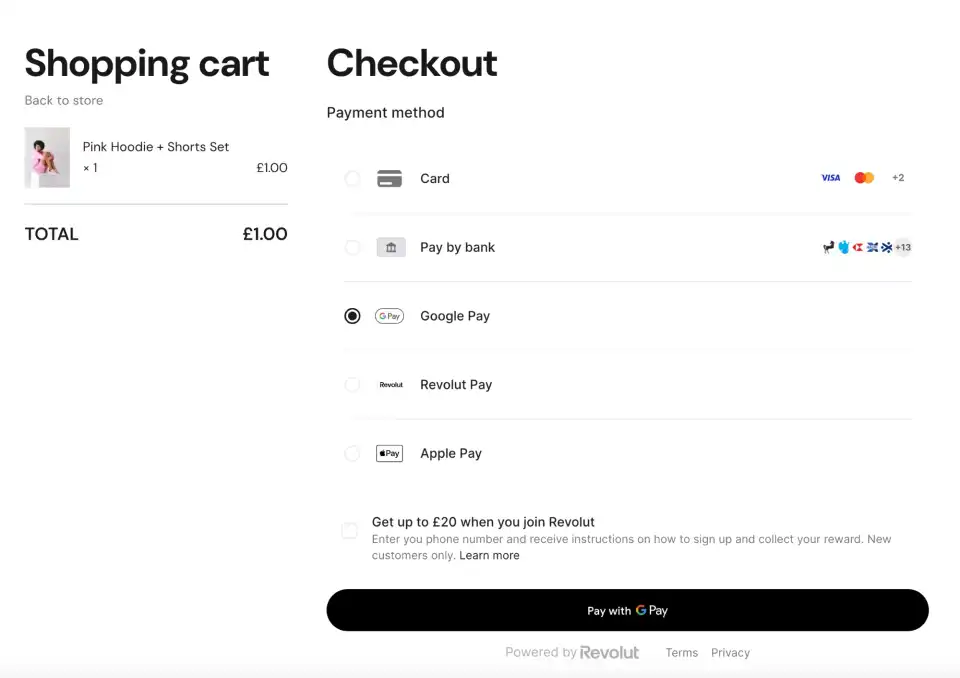
Some customers want to tap Apple Pay on their iPhone. Others prefer Google Pay, a bank transfer or a card. Version 4 puts all of these on one checkout:
- Cards: Visa, Mastercard, Maestro, and American Express if your Revolut account supports it
- Revolut Pay
- Apple Pay (new in version 4)
- Google Pay (new in version 4)
- Pay by Bank (new in version 4)
You choose which methods appear, straight from your Revolut Business account.
One-click checkout for returning customers
Customers who have paid with Revolut Pay before don't need to type their payment details again. They confirm in one click. Fewer steps at checkout means more visitors finish their order.
Lower fees and next-day payouts
Revolut's processing fees are lower than processors like Stripe. You can save up to 33% (about a third) on what you pay to take card payments.
Payouts settle to your Revolut Business account in under 24 hours, so money from today's orders reaches you tomorrow. Read more about Revolut merchant accounts.
Start your free trial
Revolut for Ecwid costs $7.50 per month, and you can try it free before you pay. Install it from the Ecwid App Market and start accepting Revolut, Apple Pay and Google Pay payments in your store. The setup guide walks you through each step.
Frequently Asked Questions
Key Features
- Apple Pay, Google Pay and Pay by Bank at checkout
- One-click checkout for returning Revolut Pay users
- Save up to 33% on processing fees vs Stripe
- Next-day payouts to your Revolut Business account
- Set up in minutes on a redesigned settings page