The next generation of SaaS will be invoked

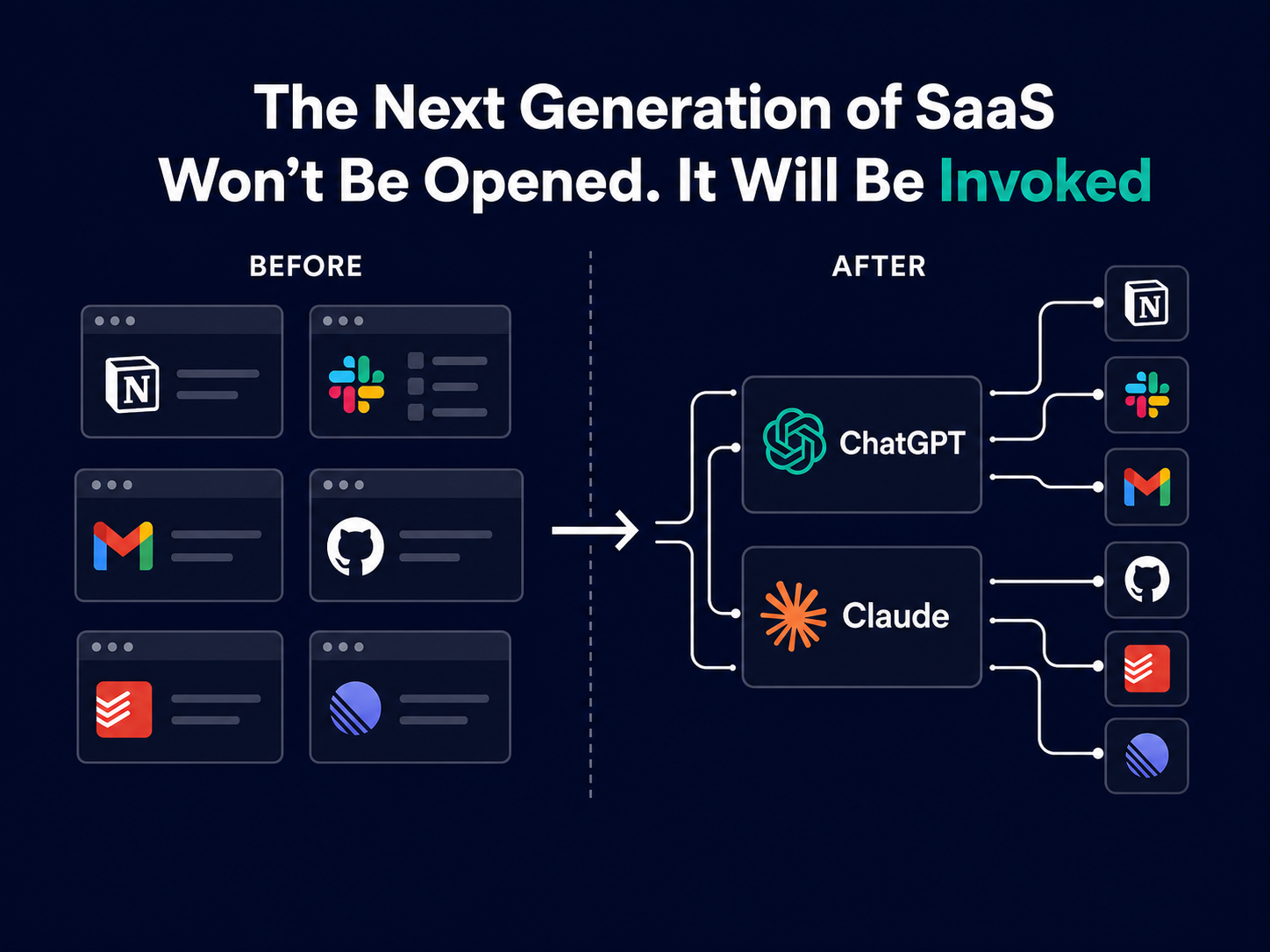
I still rely on Gmail, Slack, GitHub, Linear, and Todoist every day. Increasingly, I reach them through an AI assistant.
I can ask about an email without searching my inbox. I can connect a Slack discussion to an issue in Linear, check the related work in GitHub, and turn the result into a task.
The applications still do the work. What has changed is how I access them.
For years, SaaS products were designed to become destinations. The user opened the app, learned the interface, built a habit, and moved information between tools.
AI assistants are starting to sit above those individual applications. A user can describe an outcome in one place, then allow the assistant to find the right information and take the appropriate action across several systems.
This changes how SaaS products need to be designed, integrated, and discovered.
The user has always carried the context
Traditional software starts with an application.
Need to answer an email? Open Gmail.
Need to create a task? Open Todoist.
Need to review an issue? Open Linear.
Need to inspect code? Open GitHub.
Each product owns its interface, navigation, search, and workflow. The user moves between them and carries the context.
Someone copies an email into a task. Someone turns a Slack discussion into a ticket. Someone checks a repository to confirm whether the work has already been completed.
This creates manual work, breaks the flow of a task, and leaves room for information to get lost between systems.
AI assistants can reduce that coordination work.
Instead of opening several applications and rebuilding the context manually, a user can ask:
Review my recent project discussions, identify anything unresolved, check whether each item already has a Linear issue, and create a task when one is missing.
Completing that request requires access to several products. The assistant must find the right information, understand how it relates, and take action without losing the user’s permissions or intent.
This is where AI assistants become useful as a working layer across software.
Adding AI and integrating with AI solve different problems
Many SaaS companies have added chatbots, summarisation tools, and text-generation features to their products. These features can improve the experience inside an application.
Integration with external AI assistants addresses a wider workflow.
The assistant needs to discover what the product can do, retrieve the right context, and use the correct capability when it supports the user’s goal.
A project-management platform, for example, does not need to build a general-purpose assistant. It needs to help the assistants its customers already use:
- Find the correct project
- Retrieve the right task
- Understand statuses and relationships
- Create or update work
- Follow the user’s permissions
- Return predictable results
- Explain what changed
SaaS teams should therefore ask two separate questions:
- Where can AI improve our own product?
- Can external AI assistants use our product safely and reliably?
Treating these as separate product decisions helps teams invest in the right work.
SaaS products now serve humans and AI systems
A human user and an AI system need different interfaces.
People need clear navigation, useful visual feedback, and enough flexibility to explore. AI systems need structured capabilities, explicit permissions, stable contracts, and predictable errors.
The difference becomes important when an action carries risk.
A person may understand from context that archiving a project is reversible while deleting it is permanent. An AI system needs two clearly defined actions.
A person may spot two customers with similar names and pause. An AI system needs reliable identifiers, validation rules, and a clear way to request clarification.
A person can explore a dashboard until the product makes sense. An AI system needs an accurate description of each capability, including when to use it and what it will change.
Product design now extends beyond the graphical interface. The interface exposed to AI systems needs the same level of care.
APIs provide access. Assistants also need context.
Most established SaaS products already have APIs. Many of those APIs were designed for developers who understand the product and its data model.
They expose resources such as users, projects, tasks, and comments. An assistant usually starts with a user’s intended outcome.
An instruction such as “Update task 482” maps cleanly to an API call.
“Move the onboarding work forward without changing anything the client has approved” requires judgment and context.
Before acting, the assistant needs to determine:
- Which task the user means
- Whether the requested change is permitted
- Which other records may be affected
- Whether the user must confirm the action
- How to handle a partially completed workflow
- What information to return when the work is complete
Useful AI integration depends on clearly defined capabilities. Each one should explain when it applies, what it changes, which permissions it requires, and how failures should be handled.
Protocols such as MCP provide a common way for AI systems to connect to external tools and data. The quality of the result still depends on how clearly the underlying capabilities are designed.
AI assistants create a new route to the product
SaaS distribution has traditionally depended on search, content, advertising, marketplaces, referrals, sales teams, browser extensions, and mobile apps.
AI assistants introduce another route.
A user may describe an outcome and allow the assistant to choose from the connected capabilities. The product needs to be understandable and reliable in that environment, even when the user does not visit its homepage or open its interface.
This creates a new type of product visibility.
A SaaS product can be familiar to people and difficult for AI systems to use. A polished interface and a capable API help, but the assistant also needs clear descriptions, predictable actions, and reliable handling of permissions and errors.
Integration quality can influence which product gets used.
If an assistant can complete a task reliably through one project-management platform and regularly fails through another, the first product becomes the practical choice. This can happen without the user comparing the two products directly.
Brand and product quality remain important. Discoverability now includes the systems acting on the user’s behalf.
Interface habits may become less valuable
AI assistants can make competing products look more similar at the point of use.
A user asks to create a task. The assistant translates that instruction into the correct action for Todoist, Asana, Linear, or another connected service.
The underlying product continues to matter. Reliability, security, collaboration features, data structure, permissions, and integrations all affect the outcome.
The habit of opening a particular interface may carry less weight when routine actions start somewhere else.
SaaS companies have two broad options. They can build and own the full AI experience, or they can make their product a dependable capability within assistants their customers already use.
The second approach will suit many products. It requires focused product work: clear actions, reliable outcomes, and careful permission handling.
Dashboards still matter
Complex work benefits from visual interfaces.
People need dashboards to inspect data, compare results, configure systems, manage permissions, audit actions, and handle unusual cases.
Routine work can move into the assistant:
- Find overdue cases
- Summarise a customer’s history
- Create tasks from a meeting
- Reschedule an appointment
- Prepare a weekly status report
- Send an update to affected clients
The dashboard remains useful for depth, oversight, and exception handling. The assistant offers a faster route to common actions.
The strongest products will support both experiences and make the handover between them clear.
What SaaS teams should prioritise
AI integration deserves the same product discipline as any customer-facing feature.
Start with a specific workflow that creates real friction. Look for repeated admin, duplicated data entry, disconnected systems, or tasks that require people to carry context between applications.
Then make the underlying business logic accessible independently from the dashboard.
Keep each capability small and clear. Separate read operations from write operations. Ask for confirmation before sensitive actions. Return structured results that both the assistant and the user can understand.
Identity and permissions must remain intact throughout the workflow. The product should always know who authorised an action and what that person is allowed to do.
Audit logs should answer three practical questions:
- What did the user request?
- What did the assistant attempt?
- What did the product change?
Teams should also test their capabilities with more than one assistant. The aim is to support the places where customers choose to work, without creating unnecessary dependence on a single provider.
A practical question for SaaS builders
SaaS teams have spent years asking how to bring users back into their products.
They now need to consider how the product works when an AI assistant becomes the starting point:
- Can the assistant understand what the product does?
- Can it retrieve the correct context?
- Can it separate safe actions from sensitive ones?
- Can it act without bypassing identity or permissions?
- Can it explain the result clearly?
- Does the product remain useful when the user does not open the dashboard?
At Celestify, we help businesses connect systems, automate practical workflows, and build software that fits the way their teams work. Preparing a SaaS product for AI assistants follows the same principle: start with a real operational problem, define the right capabilities, and make each action reliable.
If your users are already working through AI assistants, it may be time to review how easily those assistants can understand and use your product.